 Back to WindReign
Install on Mac
Download the Apple Silicon DMG from the website. Open it and drag WindReign into Applications. When copying finishes, start the game from Applications.
After the copy finishes, eject the disk image. For a first visit, Guest lets you choose a nickname and enter the lobby. For Google sign-in, complete authorization in the browser and switch back to WindReign to finish entering the game.
In-game updates
From 0.1.13, WindReign checks for updates at startup, downloads and verifies changed files, then restarts automatically. Run the installed copy from Applications. For a manual check, open Home → Release notes in the lobby. In 0.1.7 through 0.1.12, confirm the in-game update once. For 0.1.6 or earlier, install the current DMG once.
If the updater cannot write the new version, quit WindReign, eject the DMG and launch the copy inside Applications. If the update still fails, install the current DMG from the official download page.
Play your first match
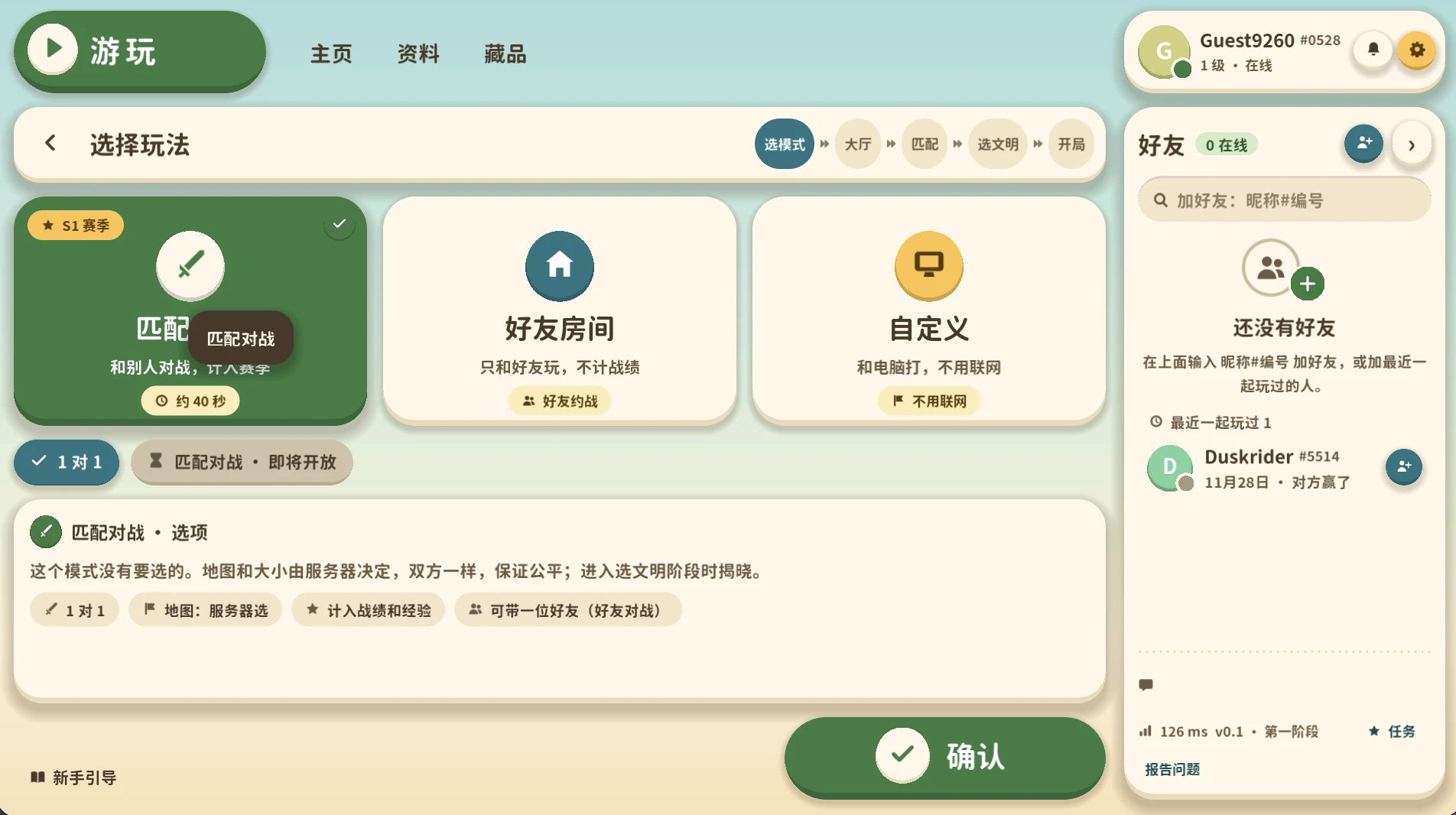
- Sign in or enter as a guest. Select Play in the upper-left corner of the lobby.
- Choose Custom to practise against the computer. Confirm the settings, pick a civilization and start.
- Press H to find your town centre. Train workers and assign them to gather resources. Select a worker to open the build menu.
- Select a worker, choose a farm and click a valid tile inside your border. Once the farm is complete, send a worker there with a right click. Build a timber camp near trees to pay for more buildings.
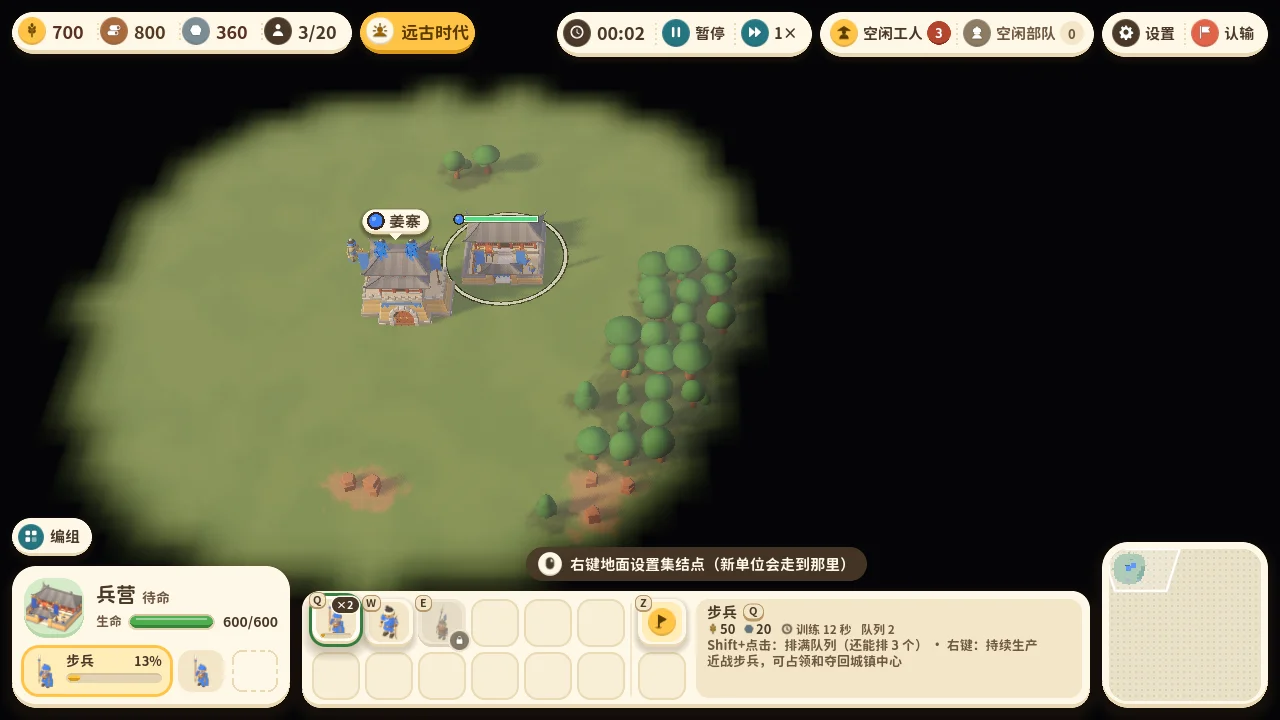
- Select your town centre and start Military I when you have 120 food. After it completes, select a worker, build a barracks and train infantry. Press I to return to the barracks after checking your economy.
- Send a small group to scout. The map and starting positions can vary, so reveal the terrain before sending your army towards an enemy centre.
Play modes, friends and rating
You can register a guest account later from Profile and keep its match history and level. To change your look, go to Profile → Edit player card → Choose avatar. The gallery starts with six original portraits and shows the current selection. Choose a character, then confirm to apply it to your card. Choose Cancel to keep your current avatar. Your nickname and banner colour are also editable on the card.
- Public matchmaking. Choose Play and the matchmaking card, confirm and stay in the queue. The server assigns the map. Select a civilization when the match is ready. During the beta the server can supply an AI opponent when few people are online.
- Friend duel. In Friends, enter the nickname and four-digit tag from the player’s card, for example Guest0783#5791. Send a request and have the other player accept it. With both players online, open Play → Friend room, create the room and invite the friend. Confirm readiness before starting.
- Custom game. Choose the map, teams, population limit and computer difficulty. Use this offline mode to learn a build order or try a new civilization.
The leaderboard after Collections ranks players by competitive rating. Finish a scored public match to appear. Public AI matches count at half the weight of a human match. The top 100 are ordered by Glicko‑2 rating, with ties sharing a place. Friend rooms and offline custom games do not change competitive rating.
Resources and trade
| Resource | Where to work | What to check |
|---|---|---|
| Food | Farm | A city supports up to five farms, including construction sites. Expand to another city if the first has reached its limit. |
| Wood | Timber camp by a forest | The number of forest tiles within two tiles of the site determines how many workers can work there. |
| Ore | Mine by an ore deposit | Mines use the same placement rule. Camps and mines need at least two suitable resource tiles and can provide up to eight jobs. |
A completed, stable city supplies one food and one wood every three seconds. An idle worker looks for a free job after five seconds. To choose a specific job, select the worker and right-click the production building. Check the available slots if assigning another worker has no effect.
Build one market per city and select it to exchange stocks. Each lot sells 100 units for another resource. At starting prices 100 wood buys 66 food. All players share the prices, so check the current quote before selling again.
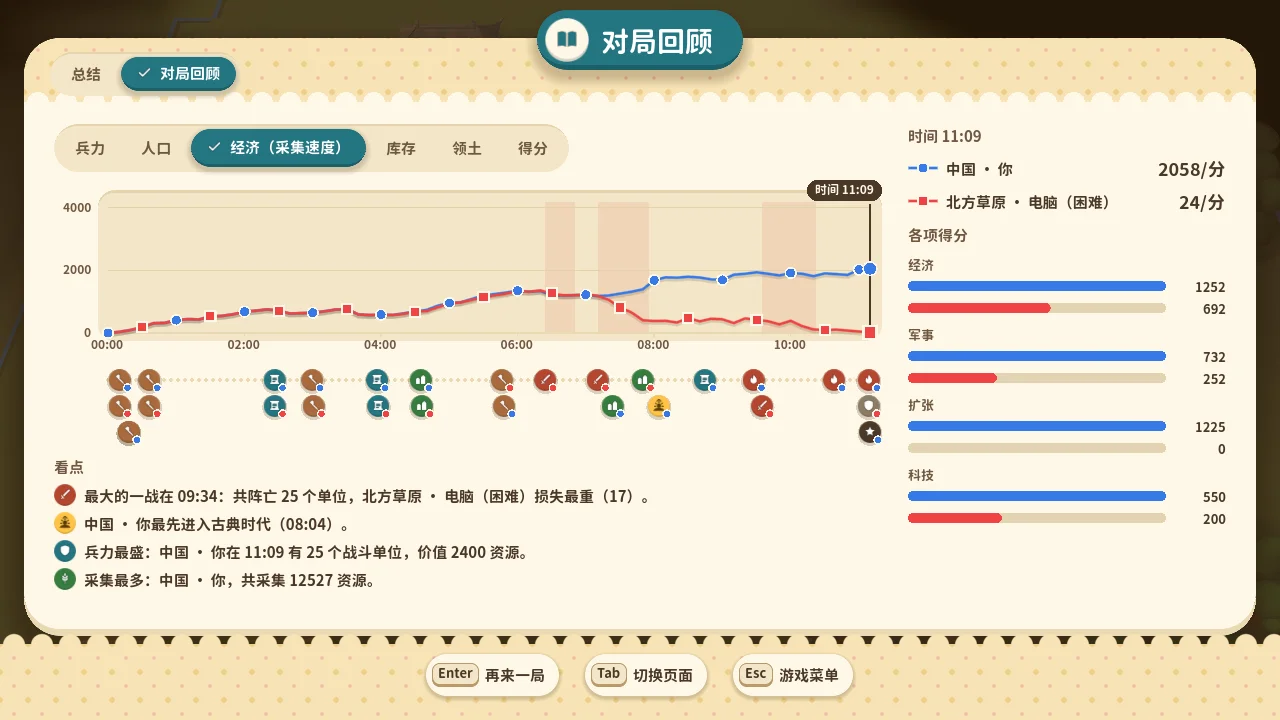
Farm construction costs 60 wood for one worker slot. A timber camp costs 50 food, a mine 80 wood, and a market 40 food and 120 wood. Assign miners early if you want a steady supply of infantry or research materials.
Cities, barracks and defences
- Town centre. Train workers and start research here. Every stable city provides 12 population slots. To found another city, select a worker, fit the whole site inside your territory and leave at least 11 tiles between city centres.
- Barracks. Complete Military I to unlock construction. A completed barracks trains infantry, archers and, from Age II, heavy infantry. To set a rally point for newly trained troops, select the barracks and right-click the destination.
- Tower and fort. A completed tower or fort within five tiles of your city centre prevents an enemy from claiming the fallen city while the defence stands. A fort also projects a fixed nine-tile territory radius. Leave at least eight tiles between a new fort and each of your cities and forts.
If training is unavailable, select the producer and check its construction progress, required age, resources and population cap. Clearing a job at a mine frees a work slot, but the worker still counts towards population.
| Building | Cost | Availability or range |
|---|---|---|
| Town centre | 300 wood + 100 ore | Make room for the whole site inside your border. |
| Barracks | 150 wood | Military I. |
| Tower | 115 wood + 50 ore | Shoots up to six tiles. |
| Fort | 225 wood + 150 ore | Age II and Military II. Shoots up to seven tiles. |
| Temple | 120 wood + 80 ore | Age II. Build near the city you want to strengthen. |
Workers cost 50 food each and can build, gather and repair. Infantry cost 50 food and 20 ore. Archers cost 30 food and 40 wood and shoot up to five tiles at base range. Heavy infantry cost 70 food and 50 ore. Several workers can build together, with diminishing returns from each extra builder.
Civilizations, ages and military research
Choose a civilization before loading the map. During the match select your town centre to inspect the next age and its cost. Save the required resources, start advancement and check the age indicator when it finishes. WindReign has nine ages. Beyond the first, each adds five population slots. Later ages also improve soldiers, building durability and gathering speed.
| Military level | Earliest age | Cost |
|---|---|---|
| I | I | 120 food |
| II | I | 100 food + 100 ore |
| III | II | 160 food + 200 ore |
Each completed Military level adds 20 population slots, up to the match limit. Military I unlocks the barracks and Military II is required for forts. Military and Civic projects share a research slot across your cities. If another city is already researching, wait for it to finish.
The beta offers China, the Northern Steppe and the Western Steppe. Your choice determines city names and visual style. The nine ages are Ancient, Classical, Medieval, Gunpowder, Enlightenment, Industrial, Modern, Information and AI. The first advance costs 400 food, 300 wood and 200 ore and takes about 60 seconds at normal speed.
You can also advance by clicking the age badge at the top. An eligible selected town centre takes priority. Otherwise, the eligible town with the lowest ID advances. Hover to see the town, next age and cost. While advancing, the badge shows the responsible town and progress. The AI Age is the final age.
Civic research and borders
Research Civics at any completed town centre you own. Each level increases the base territory radius of every city you own, including cities you build later. Military research has its own levels. Only one research project can run at a time.
| Civic level | Base radius (tiles) | With temple (tiles) |
|---|---|---|
| 0 | 16 | 19 |
| 1 | 17 | 20 |
| 2 | 18 | 21 |
| 3 | 19 | 22 |
| 4 | 20 | 23 |
| 5 | 21 | 24 |
| 6 | 23 | 26 |
| 7 | 25 | 28 |
A completed temple adds 3 tiles to the radius of its own city. Select a town centre to see the actual radius including its temple bonus.
Civic levels I–VII first become available in Ages I–VII respectively. Select a completed town centre outside assimilation, open research and compare the current and next radius. Finish the project to update every friendly city. A fort keeps its own nine-tile radius.
Build a single temple within six tiles of its city centre. Once completed it also adds 25% to that centre’s maximum health. For example, at Civic IV two cities both have radius 20. Finish a temple in the first and its radius becomes 23, while the second remains at 20. Competing enemy influence can still constrain the border you see on the map.
Each Civic level takes one quarter of the resources and time for advancing from its required age to the next. Civic I costs 100 food, 75 wood and 50 ore and takes about 15 seconds at normal speed. Where borders overlap, the stronger influence controls the tile. Equal influence leaves a neutral tile.
City capture and victory
- Scout the target. Find the town centre and check for nearby towers or forts. If a completed enemy tower or fort protects the city from within five tiles, destroy that defence first.
- Reduce the town centre to zero health, then move infantry or heavy infantry within two tiles. Archers can help damage the centre. You need the infantry at the city to take ownership.
- Defend the captured city through assimilation, normally two minutes. Its former owner may still retake it. A player who loses their last city may therefore remain in the game while recapture is possible. The last remaining team wins.
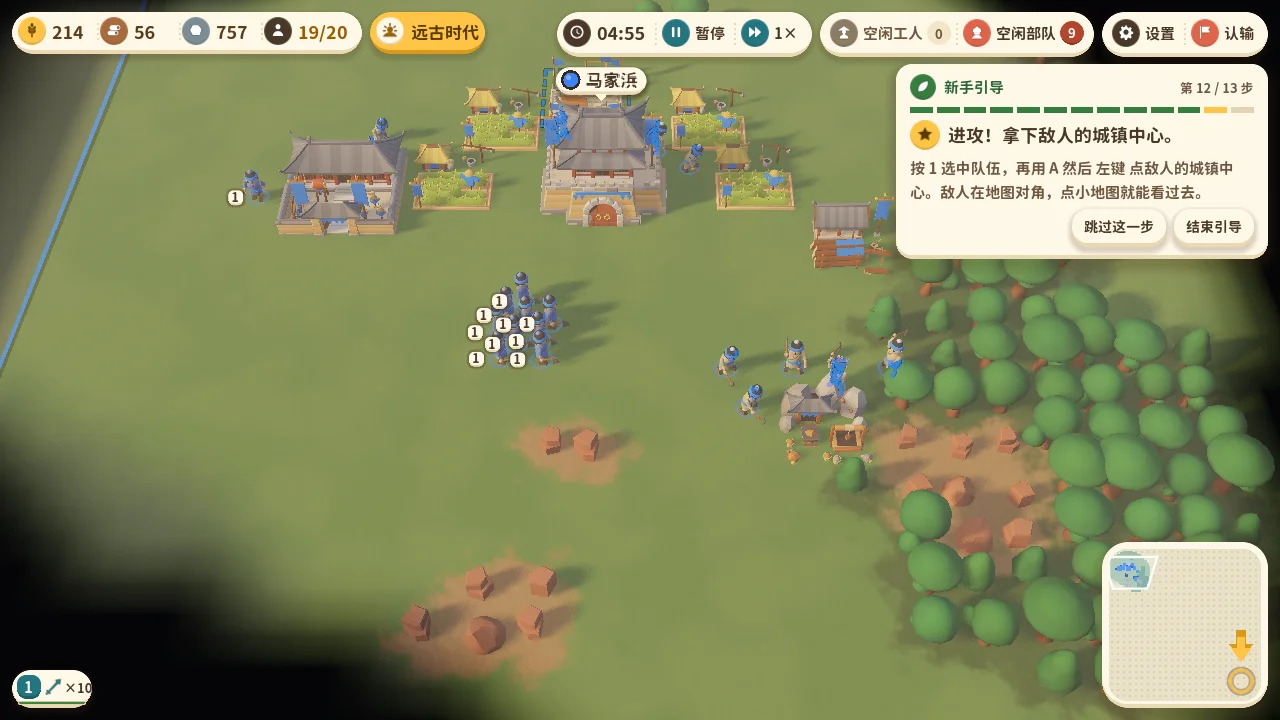
During assimilation the affected land is neutral and neither side can place new buildings there. If the former owner recaptures the city, control returns immediately. If the last teams are eliminated simultaneously, the match is a draw.
Keyboard shortcuts
- H
- Cycle through your town centres
- I
- Cycle through your barracks
- B → 2 → Q
- With a worker selected, choose Build, Military, Barracks in sequence, then click to place
- .
- Select the next idle worker
- A → Left click
- Attack-move to the clicked location
These are the default bindings. If you have remapped a key, check the shortcut on the in-game button or in keyboard settings.
| Default keys | Action |
|---|---|
| Shift + . | Select all idle workers. |
| , / Shift + , | Select the next idle soldier or all idle soldiers. |
| Right click / Shift + Right click | Give the selection a contextual order, or add it after the current order. |
| R → Left click | Order selected workers to repair a damaged friendly building. |
| S / X | With units selected, stop or explore. With a producer selected, X clears its rally point. |
| ⌘ / Ctrl + 1…9 / Shift + 1…9 | Assign the selection to a numbered group or add it to an existing group. Press the digit to recall the group or press it twice to centre the camera. |
| F1 / Esc | Open the controls reference or cancel the current action. |
| F5 / F9 | Quick-save or load in local games. |
Troubleshooting
- Why is a friend missing from search?
- Ask them to read the nickname and tag from their current player card, including leading zeros. Enter the full nickname#1234 and make sure both games are connected to the current test service.
- Google sent me back to the game, but where is my session?
- Return to the original WindReign window. If it still reports a connection error, check connectivity, let the startup update finish and start a fresh sign-in from the game.
- Why is the barracks button unavailable?
- Check Military I at your town centre, select a worker and inspect the resource cost. Use I to select an existing barracks. Use B → 2 → Q to start a new one.
- Where do I report an issue?
- Use Report an issue in the lobby. Include the WindReign version, game mode, what you clicked and what happened. For installation or sign-in issues you can also use the support email below.
- Why is Friend room greyed out?
- Confirm that both players are signed in, online and up to date. Ask a friend who is in a match to return to the lobby before inviting them. Custom practice is available offline.
- Why did only one city gain territory?
- A temple affects its own city. For nationwide growth, finish Civic research and compare the radius shown on each town centre.
Version 0.1.17
Player cards now include a portrait gallery. The first collection contains six characters, and new portraits appear here when published. Select a portrait and confirm to use it or cancel to keep your current avatar.
You can also advance by clicking the age badge at the top.
Version 0.1.16
Civic research now expands city borders. Town centres show their territory radius, and I cycles through your barracks.